Apple TV 6.1 Lets iOS Device Users Use AirPlay Via Bluetooth

Apple’s AirPlay is one of the more prominent examples of Apple’s ‘it just works’ ecosystem and is arguably the best reason to own an Apple TV. Being able to take audio and video from an iOS device and throw it over to a big-screen TV or audio system is the thing of dreams, and the fact it works so well just adds to the mystique.
With the release of iOS 7.1 a couple of days ago, it seems that Apple made an important addition to the way AirPlay currently works. According to the release notes for the accompanying Apple TV 6.1 software update, iPhones, iPads and iPod touches running the latest version of their mobile operating system will now be able to discover an Apple TV using nothing more than Bluetooth. Prior to the update both the Apple TV and iOS device needed to be on the same network subnet, with that network also configured to allow Bonjour traffic. This isn’t always the case, especially in schools, offices and college campuses.
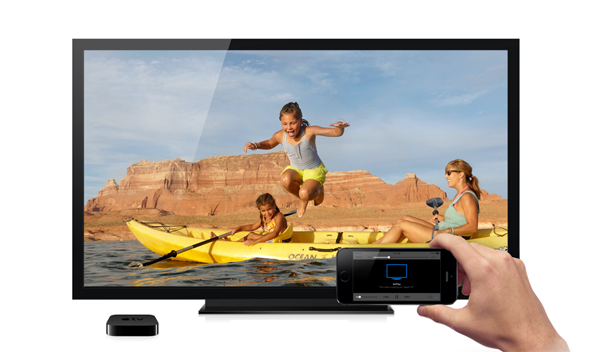
Thanks to the update though it’s now possible to initiate an AirPlay connection using Bluetooth, meaning those who were previously unable to take advantage of AirPlay are now no-longer left out in the cold.
According to Apple’s own docs, in order to make the magic happen users will need to have Bluetooth enabled on both the iOS device and the Apple TV and for both to have been updated to the latest version of their respective iOS releases. Assuming all those boxes are ticked, then you’re good to go and ready to dive into the world of AirPlay.
There are plenty of other improvements in both the 6.1 software update for Apple TV and iOS 7.1 for iPhones, iPads and iPod touches, but if AirPlay has previously been a pain in the rear for you, then this new Bluetooth support may be just what you’ve been waiting for.

Apple TV 6.1 software update
Give it a shot right now and let us know what you think about the addition in the comments section below. We’re sure you’re as excited as we are about this!
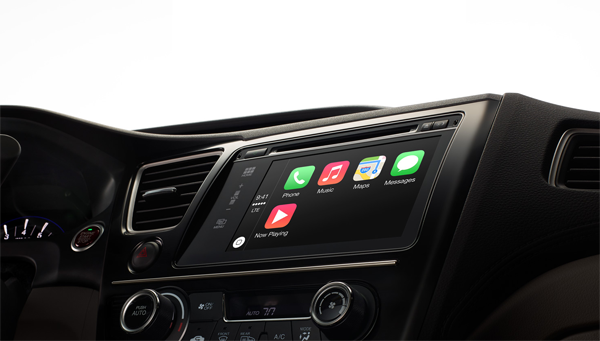
Pioneer’s Aftermarket CarPlay Hardware Will Bring iOS To Existing Cars [Report]

CarPlay, a term Apple uses to describe its all-new, in-car operating system, was showcased heavily last week at the Geneva Motor Show by the likes of Volvo and Ferrari. Since then, we’ve seen the Cupertino company drop iOS 7.1, bringing official CarPlay support to the iPhone, and with most of the pieces now seemingly in place, we’re just waiting on the manufacturers to come through with the release of compatible automobiles. But while it has seemed, hitherto, like users would probably have to buy a new car in order to take advantage of CarPlay, Pioneer may be poised to develop CarPlay integration for upcoming systems, as well as those already installed.
The scoop arrives courtesy of MacRumors, and states that Pioneer – maker of some pretty solid audio and navigation systems for cars – wants to offer widespread aftermarket CarPlay support.
So far, Apple has been on the campaign trail in showcasing its new voice-controlled in-car system, but the recurring theme has been that CarPlay will be installed in cars before the point of sale. Thus, we have been led to believe that in order to enjoy CarPlay, one would, for the most part, have to go out and pick up some new wheels. And picking up a Ferrari one fine evening is no easy feat.
The mere fact that CarPlay does work with BlackBerry’s widely-used QNX Car Platform indicates that Pioneer’s ambitions aren’t misplaced, though, and so those who may wish to reap the benefits of CarPlay without buying a brand-new car may turn to the likes of Pioneer.
Certainly, there hasn’t been much talk of widespread support for an abundance of pre-existing cars, and it is here that Pioneer could really flourish. With millions of iPhone users worldwide, only a few of them will be planning to purchase a new car from one of Apple’s many partners, including the likes of Honda, Jaguar, Hyundai, and General Motors, and hence why such an aftermarket solution would likely prove incredibly popular.
It’s worth pointing out that none of this is concrete, and Pioneer has made no official announcements either way. But if the company, and others within its industry, begin to pledge support for CarPlay, eventually, integrating Apple’s tech into your current system could be a fairly simple, painless process.

Family Guy Game For iOS And Android Shown Off In Teaser Screenshots

Back in December, we got word that FOX would be teaming up with TinyCo to develop the very first official mobile game for the long-running series Family Guy. Having been on our screens for so many years, it would seem strange that an animation of Family Guy’s stature hasn’t been handed its very own title before now, but for fans of Seth MacFarlane’s iconic comedy show, the teasing screen captures released on Thursday are sure to whet the appetite.
Scheduled to release next month, we already know that the title will be quite strongly based around the stories and themes explored throughout Family Guy’s historic tenure as one of FOX’s flagship programs, and with 212 episodes (and counting) having aired from the get-go, it’s not as though TinyCo is going to have problems filling up a whole game.
It will be free to download and play, although as is increasingly becoming the case, will almost certainly offer in-app purchases. Part and parcel of apps and games of today, the freemium model is strongly favored by developers looking to generate revenue after the point of sale, and if, as is likely to be the case, the Family Guy game has its own form of virtual currency, the popularity of the franchise alone could see FOX and TinyCo rake in a tidy sum.
The screen captures released today don’t tell us much, rather showcasing the various characters playing their traditional roles. Joe, the wheelchair-bound cop, is seen making a jump towards the endearingly-stupid Peter (who, of course, is wearing ladies clothes) in one scene, while another depicts Mort, Peter, Quagmire, and Chris outside outside The Drunken Clam, pulling poses that fans of the show will have seen a million times before.

After the publicity stunt that saw Brian Griffin, the family’s dog, ‘die’ in a hit-and-run recently, some have begun to wonder if the show – now in its twelfth series – has lost its way. As a long-time watcher, I think it’s always hard to maintain originality, but the fact that the characters are, on the whole, pretty relatable to folks we know in real life, I think the show – and this spin-off title – have plenty to offer.
The title will drop next month for both iOS and Android, and as soon as it does, we’ll be sure to let you guys know, so stay tuned!

The 12 Best iOS 7 Themes for iPhone

There have been a lot of new Winterboard themes hitting Cydia lately so we decided to compile 10 of the best themes out there right now. Of course if you missed ourprevious top 10 video , make sure you check that out as well.

Enkelt Neue – $2.99

This is a very colorful theme that still has a flat look but still gives the icons some depth.  It’s pretty simplistic and in some areas still resembles the original iOS 7 icons.

Anode – Free

Anode is a free theme that has a color scheme for every color of the iPhone 5s. There’s a Space Grey, Silver, and Gold color and they do a great job of matching the colors to fit your specific device.

iRa – $2.00

iRa is a high contrast theme that has over 100+ icons. You’ll also notice the cellular and wifi indicators from the theme. If you’re into colorful themes you might just want to grab iRa. You need to add the following repo http://repo.ifans.com/ to purchase and install the theme.

UltraFlat for iOS 7 – Free

From the name, as well as the screenshots, you can see that this is a flat and colorful theme. It has more of a cartoony look with enlarged icon logos. The nice thing about this theme is even non-supported icons blend in because the theme uses the same colors as the original iOS 7 icons.

Radiance for iOS 7 – Free

This may be my favorite out of the 10 themes listed here. These icons have a nice look that aren’t too far from the original iOS 7 icons.  It is a little more colorful and unneeded details of some icons have been taken out to give the icons a more simplistic look.

Mojo for iOS 7 – Free

Mojo is another great theme that’s available for free on Cydia.  The color scheme is a little muted and somewhat dull, but have nice pops of color throughout that make is nice on the eyes.

3 4 All – Free

Here is a free theme that stands out from the rest.  This theme by far has the most detail and some users aren’t big fans of that in iOS 7.  I actually think this theme looks great on iOS 7 and it’s something a little different from what I would usually use on my device, but the dark color scheme is what really drew me in.

TOAST – $2.50

This is a really nice theme.  The colors are a bit faded, which it’s right on par with my style.  I like nice, soft colors, with minimalistic glyphs and this theme is exactly that.

Carla – $2.99

Carla is a popular theme that has been updated for iOS 7 and as you can see, has a lot of detail. The nice thing about this theme is that a lot of the icons, if seen individually, you would think were all part of a different theme. But, when you bring it all together, it just works.

Flawless HD – $2.99

Here is a predominantly white and red/orange theme. The icons have been scaled down a bit as well as being a little more rounded, but you can really see the attention to detail by the developer.

ayecon – $2.99

ayecon was a very highly anticipated theme that really changed the way people looked at iOS themes when it was released for iOS 6.  Now, it’s been updated for iOS 7 and you can see the amount of detail that went into every single icon. It was a staple in the theming world for iOS 6 and the iOS 7 version doesn’t disappoint. Check out this post for a more detailed video walkthrough of the theme.

Aura – Free

This is my favorite theme and one you will most likely see in most of my tweak videos. The size and shape of the icons are perfect and the 200+ supported icons makes it even that much better. If you can find an icon that’s not supported, the icon mask does a really good job of making it fit right in.  I’ve had this theme enabled on my device since it’s released and don’t plan on getting rid of it any time soon. It recently went free if you add the developers repo: http://cydia.myrepospace.com/iApexthemes.  Check out this post for a more detailed video walkthrough of the theme.

Mavericks How-to: Block contacts in FaceTime and iMessage on OS X

With the highly anticipated update to Mavericks 10.9.2, users gained the ability to block contacts in FaceTime and iMessage. This has been a long-awaited addition, since iOS 7 received this featurefive months ago. If you previously blocked people in iOS 7, the block list syncs over from your iOS devices to your Mac through iCloud. Make sure Documents and Data is turned on in order for that to occur.
Now with Mavericks, you are able to block certain phone numbers from iMessaging or FaceTiming you without needing to get up and grab your iOS device…

To get started, go into Messages or FaceTime and open the app’s Preferences. To get to preferences you can press command and comma at the same time, or click on Messages/FaceTime from the menu bar and then select Preferences.
      

Mời xem ý tưởng thiết kế smartwatch theo phong cách truyền thống với giao diện đẹp

Hầu hết những chiếc smartwatch hiện nay có thể được chia làm hai loại: loại thứ nhất mang thiết kế theo hơi hướng tương lai như kiểu Pebble, Galaxy Gear hay Gear Fit, còn loại thứ hai mang phong cách thông thường như những chiếc đồng hồ tích hợp Bluetooth của Citizen, Casio và Cookoo nhưng lại sở hữu ít tính năng hơn. Đồng ý rằng những chiếc như Pebble rất thu hút với nhiều chức năng thông minh khác nhau, nhưng thiết kế to lớn của nó vẫn đang là rào cản với số đông mọi người. Vậy tại sao smartwatch không thể trông giống như những chiếc đồng hồ đeo tay bình thường khác?

Nhà thiết kế tự do Gábor Balogh ở Hungary cũng là người thích một chiếc đồng hồ đẹp, trông-giống-một-chiếc-đồng-hồ và tất nhiên là cũng phải thông minh. Nhưng điểm khác biệt giữa Balogh với chúng ta đó là khi đã thích thì anh sẽ bắt đầu thiết kế ra một sản phẩm mà anh tin rằng nó sẽ trở thành tương lai của smartwatch. Thực chất thì ý tưởng của Balogh cũng đơn giản thôi, đó là lấy thiết kế của chiếc đồng hồ Havana của hãng Triwa (có sự cho phép của công ty) rồi thay thế mặt đồng hồ bằng một màn hình tròn. Thiết kế của anh tập trung vào giao diện người dùng chứ không phải là thiết kế sản phẩm bởi hiện nay các hãng đồng hồ đã làm quá tốt vế sau rồi. "Trong ý tưởng này, giao diện không có một phong cách nào được định sẵn, nhưng nó sẽ phù hợp với bộ vỏ bên ngoài. Chỉ có cách điều hướng mới cần phải quan tâm".

Khi bạn ghép đôi chiếc đồng hồ này với điện thoại của mình, những icon tương ứng sẽ xuất hiện. Nội dung thông báo, bản đồ, nhạc thì sẽ được truyền từ điện thoại sang, một tính năng không còn mới mẻ gì trong thế giới công nghệ hiện tại. Khi bạn không muốn xài thiết bị này như một chiếc smartwatch, bạn có thể nhanh chóng đổi nó thành một chiếc đồng hồ thông thường. Balogh giải thích thêm rằng anh thích "những sản phẩm công nghệ kín đáo". Khi chúng phục vụ của Balogh, anh muốn chúng làm cho cuộc sống của anh trở nên dễ dàng hơn chứ không chỉ là thay đổi cách sống của anh. Balogh lấy ví dụ rằng bộ điều khiển nhiệt độ Nest và router không dây Airport Express của Apple là những sản phẩm như thế. "Chúng được gắn đâu đó ở dưới nền và làm cho cuộc sống của bạn đơn giản hơn".
Để tránh sự phiền toái với người dùng, ý tưởng của Balogh không xài đến màn hình cảm ứng và điều khiển giọng nói. Thay vào đó, người dùng sẽ tương tác với sản phẩm thông qua các nút và viền. Đặc biệt, phần viền là điểm mấu chốt trong giao diện này. Nó có thể được xoay để duyệt qua một danh sách dài những tin nhắn hoặc để chuyển giữa các ứng dụng với nhau. Chúng ta cũng có thể nhấn vào để chọn nữa. Thành phần xoay không nhất thiết phải là một thứ gì đó hiện hữu vật lý. Balogh tưởng tượng ra một phương pháp xoay nào đó tương tự bánh xe Clickwheel trên iPod.

Chính nhờ phần viền có chức năng như trên mà các nút giờ đây chỉ đảm trách những tính năng rất tự nhiên của chúng: chỉnh giờ, ngày, báo thức, hoặc chuyển giữa các chế độ với nhau. Việc tách biệt giữa các tính năng thông thường của đồng hồ với tính năng thông minh giúp người dùng làm quen nhanh hơn với sản phẩm bởi họ đã biết trước cách đồng hồ đeo tay hoạt động rồi. Và vì không sử dụng màn hình cảm ứng nên bạn không lo đến chuyện mặt đồng hồ bám đầy dấu vân tay. "Kích thước của đồng hồ khá hạn chế, do đó chúng ta không kì vọng nó sẽ cực kì thông minh. Tôi xem chiếc đồng hồ này như một thứ trang sức vậy".

Tất nhiên, Balogh là một nhà thiết kế chứ không phải một kĩ sư, thế nên anh tạm không nói đến những vấn đề kĩ thuật và công nghệ. Hi vọng rằng sẽ có một hãng nào đó hiện thực hóa ý tưởng của anh để chúng ta có được những chiếc smartwatch thật sự đẹp nhưng cũng không kém phần hữu ích.

Apple and iOS Continue to Make Small Gains in U.S. Smartphone Market Share

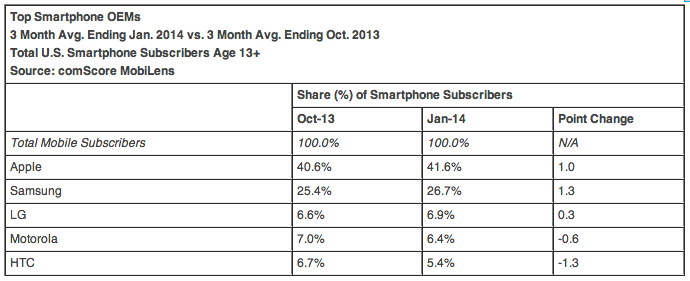
Apple retained its crown as the number one handset manufacturer among consumers in the U.S., while Google's Android operating system remained the number one platform, according to comScore's latest MobiLens and Mobile Metrix reports. These figures measure smartphone ownership and cover the three months ending January 2014. 

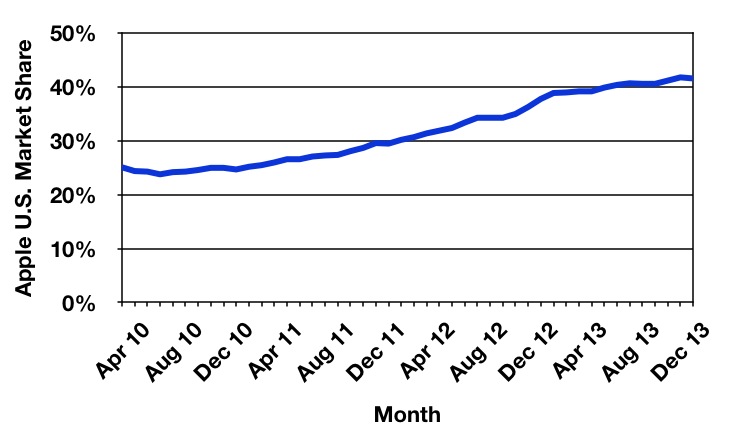
Apple beat out rival Samsung with 41.6 percent market share as compared to Samsung's 26.7 percent. When comparing changes over the measured periods, Apple, Samsung and LG made small gains, while Motorola and HTC fell. Apple's market share continues to grow, but its rate of adoption is slowing. 

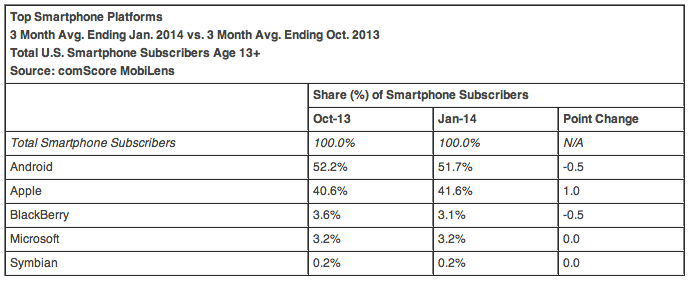
Apple may be the top handset maker, but iOS is outnumbered by the volume of Android phones on the market. Apple's iOS platform was number two with 41.6 percent of the smartphone market, while Google's Android OS was number one with 51.7 percent market share in the recently ended period. 
iOS was only the platform to gain ground in the three-month period, inching up from 40.6 percent in the period ending October 2013 to 41.6 percent in the most recent period. Android and BlackBerry lost ground, with each platform dropping 0.5 percentage points. 

comScore measures both ownership and usage across a customer's primary smartphone and tablet. It uses an intelligent online survey as well as both panel and census-based measurement methods to compile its data.